<?xml version="1.0" encoding="utf-8"?><feed xmlns="http://www.w3.org/2005/Atom" xml:lang="en"><generator uri="https://jekyllrb.com/" version="4.3.2">Jekyll</generator><link href="https://saiamrit.github.io/feed.xml" rel="self" type="application/atom+xml" /><link href="https://saiamrit.github.io/" rel="alternate" type="text/html" hreflang="en" /><updated>2023-05-13T17:35:03+00:00</updated><id>https://saiamrit.github.io/feed.xml</id><title type="html">blank</title><subtitle>A simple, whitespace theme for academics. Based on [*folio](https://github.com/bogoli/-folio) design.
</subtitle><entry><title type="html">a post with table of contents on a sidebar</title><link href="https://saiamrit.github.io/blog/2023/sidebar-table-of-contents/" rel="alternate" type="text/html" title="a post with table of contents on a sidebar" /><published>2023-04-25T14:14:00+00:00</published><updated>2023-04-25T14:14:00+00:00</updated><id>https://saiamrit.github.io/blog/2023/sidebar-table-of-contents</id><content type="html" xml:base="https://saiamrit.github.io/blog/2023/sidebar-table-of-contents/"><![CDATA[<p>This post shows how to add a table of contents as a sidebar.</p>

<h2 id="adding-a-table-of-contents">Adding a Table of Contents</h2>

<p>To add a table of contents to a post as a sidebar, simply add</p>
<div class="language-yml highlighter-rouge"><div class="highlight"><pre class="highlight"><code><span class="na">toc</span><span class="pi">:</span>
  <span class="na">sidebar</span><span class="pi">:</span> <span class="s">left</span>
</code></pre></div></div>
<p>to the front matter of the post. The table of contents will be automatically generated from the headings in the post. If you wish to display the sidebar to the right, simply change <code class="language-plaintext highlighter-rouge">left</code> to <code class="language-plaintext highlighter-rouge">right</code>.</p>

<h3 id="example-of-sub-heading-1">Example of Sub-Heading 1</h3>

<p>Jean shorts raw denim Vice normcore, art party High Life PBR skateboard stumptown vinyl kitsch. Four loko meh 8-bit, tousled banh mi tilde forage Schlitz dreamcatcher twee 3 wolf moon. Chambray asymmetrical paleo salvia, sartorial umami four loko master cleanse drinking vinegar brunch. <a href="https://www.pinterest.com">Pinterest</a> DIY authentic Schlitz, hoodie Intelligentsia butcher trust fund brunch shabby chic Kickstarter forage flexitarian. Direct trade <a href="https://en.wikipedia.org/wiki/Cold-pressed_juice">cold-pressed</a> meggings stumptown plaid, pop-up taxidermy. Hoodie XOXO fingerstache scenester Echo Park. Plaid ugh Wes Anderson, freegan pug selvage fanny pack leggings pickled food truck DIY irony Banksy.</p>

<h3 id="example-of-another-sub-heading-1">Example of another Sub-Heading 1</h3>

<p>Jean shorts raw denim Vice normcore, art party High Life PBR skateboard stumptown vinyl kitsch. Four loko meh 8-bit, tousled banh mi tilde forage Schlitz dreamcatcher twee 3 wolf moon. Chambray asymmetrical paleo salvia, sartorial umami four loko master cleanse drinking vinegar brunch. <a href="https://www.pinterest.com">Pinterest</a> DIY authentic Schlitz, hoodie Intelligentsia butcher trust fund brunch shabby chic Kickstarter forage flexitarian. Direct trade <a href="https://en.wikipedia.org/wiki/Cold-pressed_juice">cold-pressed</a> meggings stumptown plaid, pop-up taxidermy. Hoodie XOXO fingerstache scenester Echo Park. Plaid ugh Wes Anderson, freegan pug selvage fanny pack leggings pickled food truck DIY irony Banksy.</p>

<h2 data-toc-text="Customizing" id="customizing-your-table-of-contents">Customizing Your Table of Contents</h2>

<p>If you want to learn more about how to customize the table of contents of your sidebar, you can check the <a href="https://afeld.github.io/bootstrap-toc/">bootstrap-toc</a> documentation. Notice that you can even customize the text of the heading that will be displayed on the sidebar.</p>

<h3 id="example-of-sub-heading-2">Example of Sub-Heading 2</h3>

<p>Jean shorts raw denim Vice normcore, art party High Life PBR skateboard stumptown vinyl kitsch. Four loko meh 8-bit, tousled banh mi tilde forage Schlitz dreamcatcher twee 3 wolf moon. Chambray asymmetrical paleo salvia, sartorial umami four loko master cleanse drinking vinegar brunch. <a href="https://www.pinterest.com">Pinterest</a> DIY authentic Schlitz, hoodie Intelligentsia butcher trust fund brunch shabby chic Kickstarter forage flexitarian. Direct trade <a href="https://en.wikipedia.org/wiki/Cold-pressed_juice">cold-pressed</a> meggings stumptown plaid, pop-up taxidermy. Hoodie XOXO fingerstache scenester Echo Park. Plaid ugh Wes Anderson, freegan pug selvage fanny pack leggings pickled food truck DIY irony Banksy.</p>

<h3 id="example-of-another-sub-heading-2">Example of another Sub-Heading 2</h3>

<p>Jean shorts raw denim Vice normcore, art party High Life PBR skateboard stumptown vinyl kitsch. Four loko meh 8-bit, tousled banh mi tilde forage Schlitz dreamcatcher twee 3 wolf moon. Chambray asymmetrical paleo salvia, sartorial umami four loko master cleanse drinking vinegar brunch. <a href="https://www.pinterest.com">Pinterest</a> DIY authentic Schlitz, hoodie Intelligentsia butcher trust fund brunch shabby chic Kickstarter forage flexitarian. Direct trade <a href="https://en.wikipedia.org/wiki/Cold-pressed_juice">cold-pressed</a> meggings stumptown plaid, pop-up taxidermy. Hoodie XOXO fingerstache scenester Echo Park. Plaid ugh Wes Anderson, freegan pug selvage fanny pack leggings pickled food truck DIY irony Banksy.</p>]]></content><author><name></name></author><category term="sample-posts" /><category term="toc" /><category term="sidebar" /><summary type="html"><![CDATA[an example of a blog post with table of contents on a sidebar]]></summary></entry><entry><title type="html">displaying beautiful tables with Bootstrap Tables</title><link href="https://saiamrit.github.io/blog/2023/tables/" rel="alternate" type="text/html" title="displaying beautiful tables with Bootstrap Tables" /><published>2023-03-20T18:37:00+00:00</published><updated>2023-03-20T18:37:00+00:00</updated><id>https://saiamrit.github.io/blog/2023/tables</id><content type="html" xml:base="https://saiamrit.github.io/blog/2023/tables/"><![CDATA[<p>Using markdown to display tables is easy. Just use the following syntax:</p>

<div class="language-markdown highlighter-rouge"><div class="highlight"><pre class="highlight"><code>| Left aligned | Center aligned | Right aligned |
| :----------- | :------------: | ------------: |
| Left 1       | center 1       | right 1       |
| Left 2       | center 2       | right 2       |
| Left 3       | center 3       | right 3       |
</code></pre></div></div>

<p>That will generate:</p>

<table>
  <thead>
    <tr>
      <th style="text-align: left">Left aligned</th>
      <th style="text-align: center">Center aligned</th>
      <th style="text-align: right">Right aligned</th>
    </tr>
  </thead>
  <tbody>
    <tr>
      <td style="text-align: left">Left 1</td>
      <td style="text-align: center">center 1</td>
      <td style="text-align: right">right 1</td>
    </tr>
    <tr>
      <td style="text-align: left">Left 2</td>
      <td style="text-align: center">center 2</td>
      <td style="text-align: right">right 2</td>
    </tr>
    <tr>
      <td style="text-align: left">Left 3</td>
      <td style="text-align: center">center 3</td>
      <td style="text-align: right">right 3</td>
    </tr>
  </tbody>
</table>

<p></p>

<p>It is also possible to use HTML to display tables. For example, the following HTML code will display a table with <a href="https://bootstrap-table.com/">Bootstrap Table</a>, loaded from a JSON file:</p>

<div class="language-html highlighter-rouge"><div class="highlight"><pre class="highlight"><code><span class="nt">&lt;table</span>
  <span class="na">id=</span><span class="s">"table"</span>
  <span class="na">data-toggle=</span><span class="s">"table"</span>
  <span class="na">data-url=</span><span class="s">"{{ '/assets/json/table_data.json' | relative_url }}"</span><span class="nt">&gt;</span>
  <span class="nt">&lt;thead&gt;</span>
    <span class="nt">&lt;tr&gt;</span>
      <span class="nt">&lt;th</span> <span class="na">data-field=</span><span class="s">"id"</span><span class="nt">&gt;</span>ID<span class="nt">&lt;/th&gt;</span>
      <span class="nt">&lt;th</span> <span class="na">data-field=</span><span class="s">"name"</span><span class="nt">&gt;</span>Item Name<span class="nt">&lt;/th&gt;</span>
      <span class="nt">&lt;th</span> <span class="na">data-field=</span><span class="s">"price"</span><span class="nt">&gt;</span>Item Price<span class="nt">&lt;/th&gt;</span>
    <span class="nt">&lt;/tr&gt;</span>
  <span class="nt">&lt;/thead&gt;</span>
<span class="nt">&lt;/table&gt;</span>
</code></pre></div></div>

<table data-toggle="table" data-url="/assets/json/table_data.json">
  <thead>
    <tr>
      <th data-field="id">ID</th>
      <th data-field="name">Item Name</th>
      <th data-field="price">Item Price</th>
    </tr>
  </thead>
</table>

<p></p>

<p>By using <a href="https://bootstrap-table.com/">Bootstrap Table</a> it is possible to create pretty complex tables, with pagination, search, and more. For example, the following HTML code will display a table, loaded from a JSON file, with pagination, search, checkboxes, and header/content alignment. For more information, check the <a href="https://examples.bootstrap-table.com/index.html">documentation</a>.</p>

<div class="language-html highlighter-rouge"><div class="highlight"><pre class="highlight"><code><span class="nt">&lt;table</span>
  <span class="na">data-click-to-select=</span><span class="s">"true"</span>
  <span class="na">data-height=</span><span class="s">"460"</span>
  <span class="na">data-pagination=</span><span class="s">"true"</span>
  <span class="na">data-search=</span><span class="s">"true"</span>
  <span class="na">data-toggle=</span><span class="s">"table"</span>
  <span class="na">data-url=</span><span class="s">"{{ '/assets/json/table_data.json' | relative_url }}"</span><span class="nt">&gt;</span>
  <span class="nt">&lt;thead&gt;</span>
    <span class="nt">&lt;tr&gt;</span>
      <span class="nt">&lt;th</span> <span class="na">data-checkbox=</span><span class="s">"true"</span><span class="nt">&gt;&lt;/th&gt;</span>
      <span class="nt">&lt;th</span> <span class="na">data-field=</span><span class="s">"id"</span> <span class="na">data-halign=</span><span class="s">"left"</span> <span class="na">data-align=</span><span class="s">"center"</span> <span class="na">data-sortable=</span><span class="s">"true"</span><span class="nt">&gt;</span>ID<span class="nt">&lt;/th&gt;</span>
      <span class="nt">&lt;th</span> <span class="na">data-field=</span><span class="s">"name"</span> <span class="na">data-halign=</span><span class="s">"center"</span> <span class="na">data-align=</span><span class="s">"right"</span> <span class="na">data-sortable=</span><span class="s">"true"</span><span class="nt">&gt;</span>Item Name<span class="nt">&lt;/th&gt;</span>
      <span class="nt">&lt;th</span> <span class="na">data-field=</span><span class="s">"price"</span> <span class="na">data-halign=</span><span class="s">"right"</span> <span class="na">data-align=</span><span class="s">"left"</span> <span class="na">data-sortable=</span><span class="s">"true"</span><span class="nt">&gt;</span>Item Price<span class="nt">&lt;/th&gt;</span>
    <span class="nt">&lt;/tr&gt;</span>
  <span class="nt">&lt;/thead&gt;</span>
<span class="nt">&lt;/table&gt;</span>
</code></pre></div></div>

<table data-click-to-select="true" data-height="460" data-pagination="true" data-search="true" data-toggle="table" data-url="/assets/json/table_data.json">
  <thead>
    <tr>
      <th data-checkbox="true"></th>
      <th data-field="id" data-halign="left" data-align="center" data-sortable="true">ID</th>
      <th data-field="name" data-halign="center" data-align="right" data-sortable="true">Item Name</th>
      <th data-field="price" data-halign="right" data-align="left" data-sortable="true">Item Price</th>
    </tr>
  </thead>
</table>]]></content><author><name></name></author><category term="sample-posts" /><summary type="html"><![CDATA[an example of how to use Bootstrap Tables]]></summary></entry><entry><title type="html">a post with table of contents</title><link href="https://saiamrit.github.io/blog/2023/table-of-contents/" rel="alternate" type="text/html" title="a post with table of contents" /><published>2023-03-20T15:59:00+00:00</published><updated>2023-03-20T15:59:00+00:00</updated><id>https://saiamrit.github.io/blog/2023/table-of-contents</id><content type="html" xml:base="https://saiamrit.github.io/blog/2023/table-of-contents/"><![CDATA[<p>This post shows how to add a table of contents in the beginning of the post.</p>

<h2 id="adding-a-table-of-contents">Adding a Table of Contents</h2>

<p>To add a table of contents to a post, simply add</p>
<div class="language-yml highlighter-rouge"><div class="highlight"><pre class="highlight"><code><span class="na">toc</span><span class="pi">:</span>
  <span class="na">beginning</span><span class="pi">:</span> <span class="kc">true</span>
</code></pre></div></div>
<p>to the front matter of the post. The table of contents will be automatically generated from the headings in the post.</p>

<h3 id="example-of-sub-heading-1">Example of Sub-Heading 1</h3>

<p>Jean shorts raw denim Vice normcore, art party High Life PBR skateboard stumptown vinyl kitsch. Four loko meh 8-bit, tousled banh mi tilde forage Schlitz dreamcatcher twee 3 wolf moon. Chambray asymmetrical paleo salvia, sartorial umami four loko master cleanse drinking vinegar brunch. <a href="https://www.pinterest.com">Pinterest</a> DIY authentic Schlitz, hoodie Intelligentsia butcher trust fund brunch shabby chic Kickstarter forage flexitarian. Direct trade <a href="https://en.wikipedia.org/wiki/Cold-pressed_juice">cold-pressed</a> meggings stumptown plaid, pop-up taxidermy. Hoodie XOXO fingerstache scenester Echo Park. Plaid ugh Wes Anderson, freegan pug selvage fanny pack leggings pickled food truck DIY irony Banksy.</p>

<h3 id="example-of-another-sub-heading-1">Example of another Sub-Heading 1</h3>

<p>Jean shorts raw denim Vice normcore, art party High Life PBR skateboard stumptown vinyl kitsch. Four loko meh 8-bit, tousled banh mi tilde forage Schlitz dreamcatcher twee 3 wolf moon. Chambray asymmetrical paleo salvia, sartorial umami four loko master cleanse drinking vinegar brunch. <a href="https://www.pinterest.com">Pinterest</a> DIY authentic Schlitz, hoodie Intelligentsia butcher trust fund brunch shabby chic Kickstarter forage flexitarian. Direct trade <a href="https://en.wikipedia.org/wiki/Cold-pressed_juice">cold-pressed</a> meggings stumptown plaid, pop-up taxidermy. Hoodie XOXO fingerstache scenester Echo Park. Plaid ugh Wes Anderson, freegan pug selvage fanny pack leggings pickled food truck DIY irony Banksy.</p>

<h2 id="table-of-contents-options">Table of Contents Options</h2>

<p>If you want to learn more about how to customize the table of contents, you can check the <a href="https://github.com/toshimaru/jekyll-toc">jekyll-toc</a> repository.</p>

<h3 id="example-of-sub-heading-2">Example of Sub-Heading 2</h3>

<p>Jean shorts raw denim Vice normcore, art party High Life PBR skateboard stumptown vinyl kitsch. Four loko meh 8-bit, tousled banh mi tilde forage Schlitz dreamcatcher twee 3 wolf moon. Chambray asymmetrical paleo salvia, sartorial umami four loko master cleanse drinking vinegar brunch. <a href="https://www.pinterest.com">Pinterest</a> DIY authentic Schlitz, hoodie Intelligentsia butcher trust fund brunch shabby chic Kickstarter forage flexitarian. Direct trade <a href="https://en.wikipedia.org/wiki/Cold-pressed_juice">cold-pressed</a> meggings stumptown plaid, pop-up taxidermy. Hoodie XOXO fingerstache scenester Echo Park. Plaid ugh Wes Anderson, freegan pug selvage fanny pack leggings pickled food truck DIY irony Banksy.</p>

<h3 id="example-of-another-sub-heading-2">Example of another Sub-Heading 2</h3>

<p>Jean shorts raw denim Vice normcore, art party High Life PBR skateboard stumptown vinyl kitsch. Four loko meh 8-bit, tousled banh mi tilde forage Schlitz dreamcatcher twee 3 wolf moon. Chambray asymmetrical paleo salvia, sartorial umami four loko master cleanse drinking vinegar brunch. <a href="https://www.pinterest.com">Pinterest</a> DIY authentic Schlitz, hoodie Intelligentsia butcher trust fund brunch shabby chic Kickstarter forage flexitarian. Direct trade <a href="https://en.wikipedia.org/wiki/Cold-pressed_juice">cold-pressed</a> meggings stumptown plaid, pop-up taxidermy. Hoodie XOXO fingerstache scenester Echo Park. Plaid ugh Wes Anderson, freegan pug selvage fanny pack leggings pickled food truck DIY irony Banksy.</p>]]></content><author><name></name></author><category term="sample-posts" /><category term="toc" /><summary type="html"><![CDATA[an example of a blog post with table of contents]]></summary></entry><entry><title type="html">a post with giscus comments</title><link href="https://saiamrit.github.io/blog/2022/giscus-comments/" rel="alternate" type="text/html" title="a post with giscus comments" /><published>2022-12-10T15:59:00+00:00</published><updated>2022-12-10T15:59:00+00:00</updated><id>https://saiamrit.github.io/blog/2022/giscus-comments</id><content type="html" xml:base="https://saiamrit.github.io/blog/2022/giscus-comments/"><![CDATA[<p>This post shows how to add GISCUS comments.</p>]]></content><author><name></name></author><category term="sample-posts" /><category term="external-services" /><summary type="html"><![CDATA[an example of a blog post with giscus comments]]></summary></entry><entry><title type="html">Displaying External Posts on Your al-folio Blog</title><link href="https://saiamrit.github.io/blog/2022/displaying-external-posts-on-your-al-folio-blog/" rel="alternate" type="text/html" title="Displaying External Posts on Your al-folio Blog" /><published>2022-04-23T23:20:09+00:00</published><updated>2022-04-23T23:20:09+00:00</updated><id>https://saiamrit.github.io/blog/2022/displaying-external-posts-on-your-al-folio-blog</id><content type="html" xml:base="https://saiamrit.github.io/blog/2022/displaying-external-posts-on-your-al-folio-blog/"><![CDATA[]]></content><author><name></name></author></entry><entry><title type="html">a post with redirect</title><link href="https://saiamrit.github.io/blog/2022/redirect/" rel="alternate" type="text/html" title="a post with redirect" /><published>2022-02-01T17:39:00+00:00</published><updated>2022-02-01T17:39:00+00:00</updated><id>https://saiamrit.github.io/blog/2022/redirect</id><content type="html" xml:base="https://saiamrit.github.io/blog/2022/redirect/"><![CDATA[<p>Redirecting to another page.</p>]]></content><author><name></name></author><summary type="html"><![CDATA[you can also redirect to assets like pdf]]></summary></entry><entry><title type="html">Cross Entropy Demistified</title><link href="https://saiamrit.github.io/blog/2021/cross-entropy/" rel="alternate" type="text/html" title="Cross Entropy Demistified" /><published>2021-07-15T15:09:00+00:00</published><updated>2021-07-15T15:09:00+00:00</updated><id>https://saiamrit.github.io/blog/2021/cross-entropy</id><content type="html" xml:base="https://saiamrit.github.io/blog/2021/cross-entropy/"><![CDATA[<h2 id="understanding-entropy-cross-entropy-loss-and-kl-divergence">Understanding “Entropy”, “Cross-Entropy Loss” and “KL Divergence”</h2>

<p><strong>Classification</strong> is one of the preliminary steps in most Machine Learning and Deep learning projects and <strong>Cross-Entropy Loss is the most commonly used loss function</strong>, but have you ever tried to explore what is cross-entropy or entropy exactly.</p>

<h3 id="ever-imagined-why-cross-entropy-works-for-classification">Ever imagined why cross-entropy works for classification?</h3>

<p>This series of articles consisting of 2 parts is designed to explain in detail the intuition behind what is cross-entropy and why cross-entropy has been used as the most popular cost function for classification.</p>

<p>Before diving into cross-entropy loss and its application to classification, the concept of entropy and cross-entropy must be clear, so this article is dedicated to exploring what these 2 terms mean.</p>

<blockquote>
  <p>The content and images in this post are inspired by the amazing tutorial <a href="https://www.youtube.com/watch?v=ErfnhcEV1O8"></a> <a href="https://www.youtube.com/watch?v=ErfnhcEV1O8">A Short Introduction to Entropy, Cross-Entropy and KL-Divergence</a> by <a href="https://www.youtube.com/channel/UCCvGd1WBMpFQ_vtC89VF2qA"></a> <a href="https://www.youtube.com/channel/UCCvGd1WBMpFQ_vtC89VF2qA">Aurélien Géron</a></p>
</blockquote>

<h3 id="entropy"><strong>Entropy</strong></h3>

<p>The concept of entropy and cross-entropy comes from <a href="https://en.wikipedia.org/wiki/Claude_Shannon"></a> <a href="https://en.wikipedia.org/wiki/Claude_Shannon"><strong>Claude Shannon</strong></a><strong>’s Information theory</strong> which he introduces through his classical paper <strong>“</strong><a href="http://math.harvard.edu/~ctm/home/text/others/shannon/entropy/entropy.pdf"><strong>A Mathematical Theory of Communication</strong></a><strong>”</strong></p>

<p>According to Shannon, <a href="https://en.wikipedia.org/wiki/Entropy_%28information_theory%29"></a> <a href="https://en.wikipedia.org/wiki/Entropy_%28information_theory%29"><strong>Entropy</strong></a> <strong>is the minimum no of useful bits required to transfer information from a sender to a receiver.</strong></p>

<p>Let’s understand the two terms by looking into an example.</p>

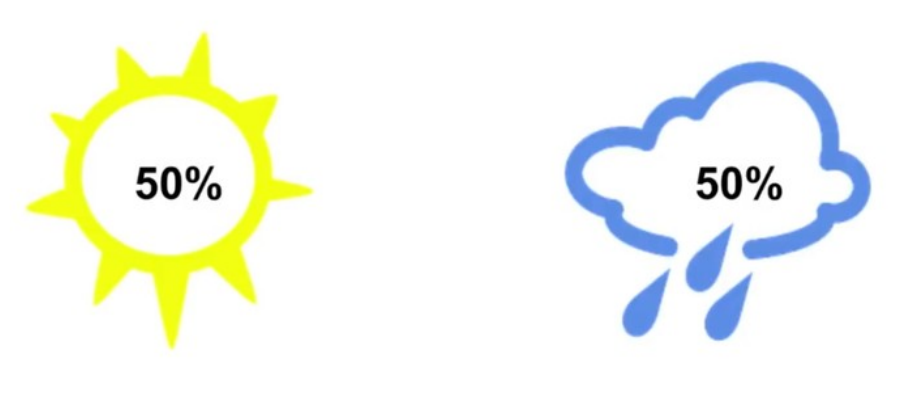
<p>Suppose that we need to share the weather information of a place with another friend who stays in a different city, and the weather has a 50–50 chance of being sunny or rainy every day.</p>

<p align="center" width="100%">
    <img width="100%" src="https://raw.githubusercontent.com/saiamrit/saiamrit.github.io/source/assets/img/cross_entropy_1.png" /> 
</p>

<p>This information can be transmitted using just a single bit (0 or 1) and the uncertainty associated with this event is 2 as there are 2 possibilities, either weather is sunny or rainy.</p>

<p><strong>If the probability of occurrence of an event is \(p\), then the uncertainty raised due to that event is given as \(\frac{1}{p}\)</strong></p>

<p>In our example, the probability of occurrence of both events is 0.5 so the uncertainty for each event is \(\frac{1}{0.5} = 2\)</p>

<p>Even if the information is transferred as a string “RAINY” having 5 characters each of 1 byte, the total information transferred is 40 bits but only 1 bit of useful information is transferred.</p>

<blockquote>
  <p><strong>Given the uncertainty due to an event is \(N\), the minimum number of bits required to transfer the information about that event can be calculated as \(log(N)\)</strong></p>
</blockquote>

<p>Here, as uncertainty for weather being rainy or sunny is 2, the minimum no. of useful bits required to transfer information about being sunny or rainy is \(log(2) = 1\)</p>

<blockquote>
  <p><strong>Note</strong> : In the article, \(log(x)\) means logarithm with base \(2\) and \(ln(x)\) means natural logarithm with base \(e\)</p>
</blockquote>

<p>Now suppose that the event “Weather” had 8 possibilities, all equally likely with \(12.5\%\) probability of occurrence of each.</p>

<p align="center" width="100%">
    <img width="100%" src="https://raw.githubusercontent.com/saiamrit/saiamrit.github.io/source/assets/img/cross_entropy_2.png" /> 
</p>

<p>So now as the no. of uncertainties is 8, the minimum no. of useful bits required to transfer information about each event can be calculated as \(log(8) = 3\)</p>

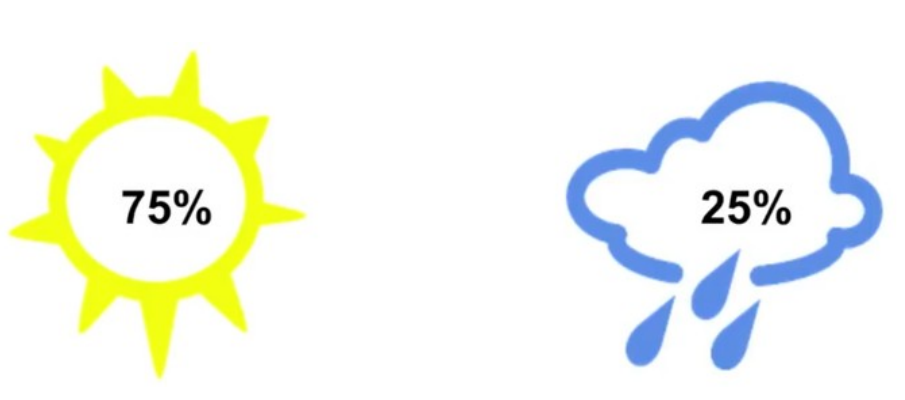
<p>Let us consider a case which is similar to the 1st case that we saw with 2 possibilities, sunny or rainy, but now both are not equally likely. One occurs with a probability of \(75\%\) and the other with a probability of \(25\%\).</p>

<p align="center" width="100%">
    <img width="100%" src="https://raw.githubusercontent.com/saiamrit/saiamrit.github.io/source/assets/img/cross_entropy_3.png" /> 
</p>

<p>Now the events are not occuring with equal probabilities, so the uncertainties for the events will be different. the uncertainty of the weather being rainy is \(\frac{1}{0.25} = 4\) and for the weather being sunny is \(\frac{1}{0.75} = 1.33\)</p>

<p>The minimum number of useful bits required the information is rainy is \(log(4) = 2\) and for the weather being sunny is \(log(1.33) = 0.4\)</p>

<p><strong>This also be derived from the probability directly as, given the probability of a given event is \(p\) , then the uncertainty associated with the occurrence of that event is \(1/p\) and hence the minimum number of useful bits required to transfer information about it is,</strong></p>

\[log\left(\frac{1}{p}\right) \text{ or} -log(p), \text{ since } [log\left(\frac{1}{p}\right) = - log(p)]\]

<p>2 bits are required to say whether the weather is rainy and 0.4 bits are required to say if the weather is sunny, so the average no. of useful bits required to transmit the information can be calculated as,</p>

\[0.75 \times log\left(\frac{1}{0.75}\right) + 0.25 \times log\left(\frac{1}{0.25}\right) = 0.81\]

<p>So on average, we would receive 0.81 bits of information and this is the minimum number of bits required to transfer the weather information, following the above-mentioned probability distribution.This is known as Entropy.</p>

\[\boxed{Entropy : H(p) = - \sum_{n=1}^{n}{p_i \times log(p_i)}}\]

<blockquote>
  <p><strong>Entropy (expressed in ‘bits’) is a measure of how unpredictable the probability distribution is. So more the individual events vary, the more is its entropy.</strong></p>
</blockquote>

<h2 id="cross-entropy">Cross-Entropy</h2>

<p><strong>Cross entropy is the average message length that is used to transmit the message.</strong></p>

<p align="center" width="100%">
    <img width="100%" src="https://raw.githubusercontent.com/saiamrit/saiamrit.github.io/source/assets/img/cross_entropy_4.png" /> 
</p>

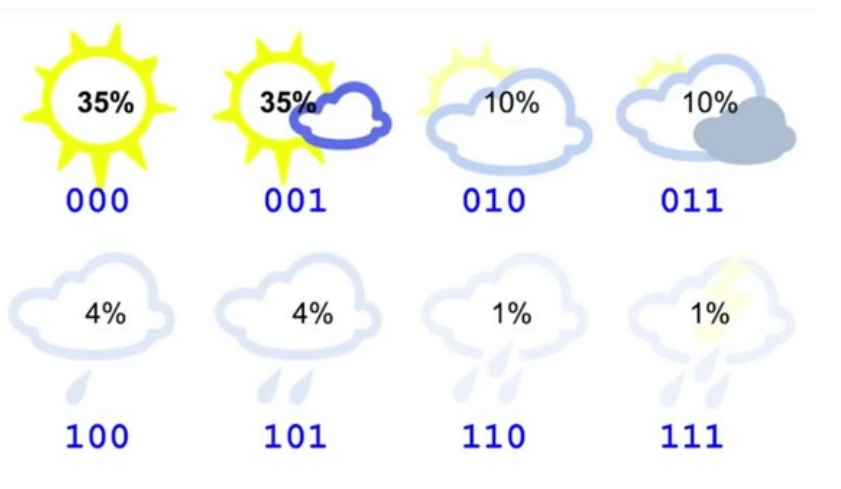
<p>In this example, there are 8 variations all equally likely. So the entropy of this system is 3, but suppose that the probability distribution changes with probabilities something like this :</p>

<p align="center" width="100%">
    <img width="100%" src="https://raw.githubusercontent.com/saiamrit/saiamrit.github.io/source/assets/img/cross_entropy_5.png" /> 
</p>

<p>Though the probability distribution has changed, we still use 3 bits to transfer this information.</p>

<p>Now the entropy of this distribution will be,</p>

<p>E = -{ 0.35 x log(0.35) + 0.35 x log(0.35)+ 0.1 x log(0.1) + 0.1 x log(0.1) + 0.04 x log(0.04) + 0.04 x log(0.04) + 0.01 x log(0.01) + 0.01 x log(0.01)} = 2.23 bits <br />
which is the minimum number of useful bits transmitted, and entropy of the system.</p>

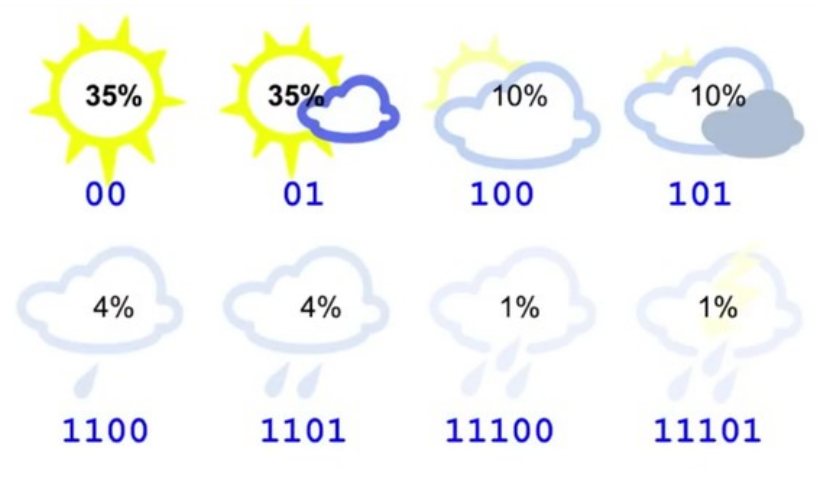
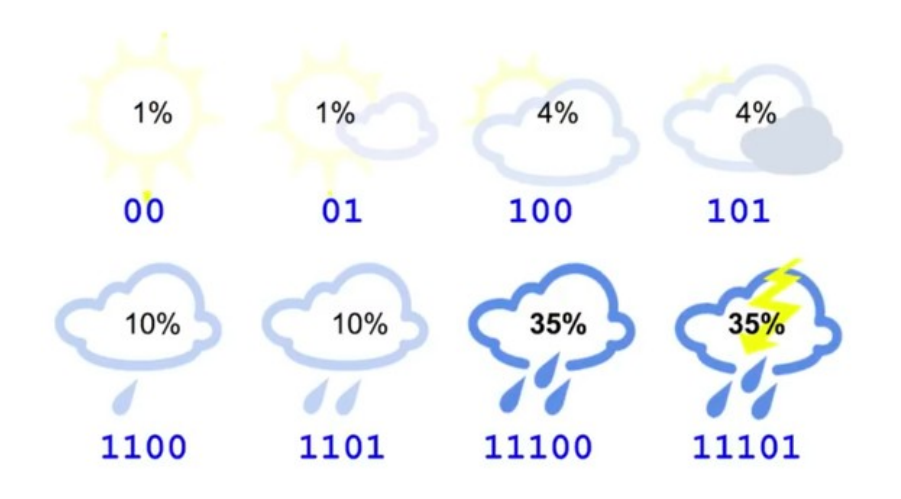
<p>So though we are sending 3 bits of information, the user gets 2.23 useful bits. This can be improved by changing the no. of bits used to address each kind of information. Suppose we use a following distribution :</p>

<p align="center" width="100%">
    <img width="100%" src="https://raw.githubusercontent.com/saiamrit/saiamrit.github.io/source/assets/img/cross_entropy_6.png" /> 
</p>

<p>The average no. of bits transmitted using the following bit pattern is,</p>

<p>\(CE = 0.35 \times 2 + 0.35 \times 2 + 0.1 \times 3 + 0.1 \times 3 + 0.04 \times 4 + 0.04 \times 4 + 0.01 \times 5 + 0.01 \times 5 = 2.42 \text{ bits}\) which is close to the entropy. This is the Cross Entropy</p>

<p>But suppose the same bit pattern is used for a different probability distribution :</p>

<p align="center" width="100%">
    <img width="100%" src="https://raw.githubusercontent.com/saiamrit/saiamrit.github.io/source/assets/img/cross_entropy_7.png" /> 
</p>

<p>\(CE = 0.01 \times 2 + 0.01 \times 2 + 0.04 \times 3 + 0.04 \times 3 + 0.1 \times 4 + 0.1 \times 4 + 0.35 \times 5 + 0.35 \times 5 = 4.58 \text{ bits}\) which is significantly grater than the entropy.</p>

<p>This happens because the bit code we are using is making some implicit estimation of the probability distribution of the weather as,</p>

\[\boxed{p = \left(\frac{1}{2^{\text{no. of bits}}}\right)}\]
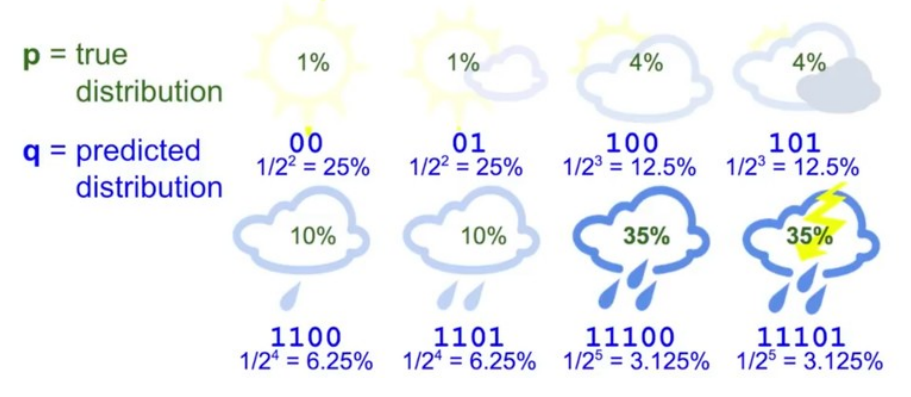
<p align="center" width="100%">
    <img width="100%" src="https://raw.githubusercontent.com/saiamrit/saiamrit.github.io/source/assets/img/cross_entropy_8.png" /> 
</p>

<p>So we can express cross-entropy as a function of both the true distribution and predicted distribution as,</p>

\[\boxed{\text{Cross Entropy }: H(p,q) = -\sum_{n=1}^{n}{p_i \times log(q_i)}}\]

<p>Here instead of taking the \(log\) of the true probability, we are taking the \(log\) of the predicted probability distribution \(q\).</p>

<p>Basically, when we know the probability of occurrence of the events, but we don’t know the bit distribution of the events, so a random distribution can be taken and given the probabilities and assumed bit distribution, cross-entropy of the events can be calculated and cross-checked with the original entropy to see if the assumed distribution gives the minimum uncertainty for the given probabilities or not. Hence it is termed as <strong>“Cross” entropy.</strong></p>

<blockquote>
  <p>Usually Cross entropy is larger than the entropy of a distribution. When the predicted distribution is equal to true distribution, the cross-entropy is equal to entropy.</p>
</blockquote>

<h2 id="kullbackleibler-divergence">Kullback–Leibler Divergence</h2>

<p><strong>The amount by which the cross-entropy exceeds the entropy is called Relative Entropy or commonly known as Kullback-Leibler Divergence or KL Divergence.</strong></p>

\[\boxed{d_{KL}(p\text{ }||\text{ }q) = H(p,q) - H(p)}\]

<p>So the key take away from this article is,</p>

<blockquote>
  <p><strong>given a probability distribution, the minimum average no. of useful bits required to transfer the information about the distribution is its Entropy which can also be said as the minimum possible randomness that can be associated with a probability distribution.</strong></p>
</blockquote>

<p>In the last example, we took an assumed bit distribution for each event and found the cross-entropy of that distribution with the original probabilities of the events. This cross-entropy resulted to be higher than the original entropy. So we tried to change the assumed bit distribution so that we can reduce the cross-entropy and make it as close as possible to the entropy.</p>

<p><strong>But wait for a second !!</strong></p>

<p><strong>Isn’t that exactly what we try to do in a classification?</strong></p>

<p>We start with a randomly initialized model that outputs an assumed bit distribution for the different classes that we want to classify, and in the process of training, we try to achieve an optimal distribution that can get us close enough to the lowest possible Entropy for the probability distribution.</p>

<p>So does that mean cross-entropy can be used to quantify how bad is the model performing in assuming the distribution?</p>

<p>Can we use KL Divergence as a metric to measure how bad the model is performing?</p>

<p>In the subsequent article, we shall explore the answer to all these questions and understand the intuition behind why Cross-Entropy is an appropriate loss function for our requirement.</p>

<h2 id="got-some-doubtssuggestions"><strong>Got some doubts/suggestions?</strong></h2>

<p>Please feel free to share your suggestions, questions, queries, and doubts through comments below — I will be happy to talk/discuss them all.</p>]]></content><author><name></name></author><summary type="html"><![CDATA[Understanding the maths behind Cross Entropy Loss]]></summary></entry><entry><title type="html">a post with diagrams</title><link href="https://saiamrit.github.io/blog/2021/diagrams/" rel="alternate" type="text/html" title="a post with diagrams" /><published>2021-07-04T17:39:00+00:00</published><updated>2021-07-04T17:39:00+00:00</updated><id>https://saiamrit.github.io/blog/2021/diagrams</id><content type="html" xml:base="https://saiamrit.github.io/blog/2021/diagrams/"><![CDATA[<p>This theme supports generating various diagrams from a text description using <a href="https://github.com/zhustec/jekyll-diagrams" target="\_blank">jekyll-diagrams</a> plugin.
Below, we generate a few examples of such diagrams using languages such as <a href="https://mermaid-js.github.io/mermaid/" target="\_blank">mermaid</a>, <a href="https://plantuml.com/" target="\_blank">plantuml</a>, <a href="https://vega.github.io/vega-lite/" target="\_blank">vega-lite</a>, etc.</p>

<p><strong>Note:</strong> different diagram-generation packages require external dependencies to be installed on your machine.
Also, be mindful of that because of diagram generation the fist time you build your Jekyll website after adding new diagrams will be SLOW.
For any other details, please refer to <a href="https://github.com/zhustec/jekyll-diagrams" target="\_blank">jekyll-diagrams</a> README.</p>

<h2 id="mermaid">Mermaid</h2>

<p>Install mermaid using <code class="language-plaintext highlighter-rouge">node.js</code> package manager <code class="language-plaintext highlighter-rouge">npm</code> by running the following command:</p>
<div class="language-bash highlighter-rouge"><div class="highlight"><pre class="highlight"><code>npm <span class="nb">install</span> <span class="nt">-g</span> mermaid.cli
</code></pre></div></div>

<p>The diagram below was generated by the following code:</p>

<div class="language-plaintext highlighter-rouge"><div class="highlight"><pre class="highlight"><code>{% mermaid %}
sequenceDiagram
    participant John
    participant Alice
    Alice-&gt;&gt;John: Hello John, how are you?
    John--&gt;&gt;Alice: Great!
{% endmermaid %}
</code></pre></div></div>

<div class="jekyll-diagrams diagrams mermaid">
  <svg id="mermaid-1683999311728" width="100%" xmlns="http://www.w3.org/2000/svg" height="100%" style="max-width:450px;" viewBox="-50 -10 450 231"><style>#mermaid-1683999311728 .label{font-family:trebuchet ms,verdana,arial;color:#333}#mermaid-1683999311728 .node circle,#mermaid-1683999311728 .node ellipse,#mermaid-1683999311728 .node polygon,#mermaid-1683999311728 .node rect{fill:#ececff;stroke:#9370db;stroke-width:1px}#mermaid-1683999311728 .node.clickable{cursor:pointer}#mermaid-1683999311728 .arrowheadPath{fill:#333}#mermaid-1683999311728 .edgePath .path{stroke:#333;stroke-width:1.5px}#mermaid-1683999311728 .edgeLabel{background-color:#e8e8e8}#mermaid-1683999311728 .cluster rect{fill:#ffffde!important;stroke:#aa3!important;stroke-width:1px!important}#mermaid-1683999311728 .cluster text{fill:#333}#mermaid-1683999311728 div.mermaidTooltip{position:absolute;text-align:center;max-width:200px;padding:2px;font-family:trebuchet ms,verdana,arial;font-size:12px;background:#ffffde;border:1px solid #aa3;border-radius:2px;pointer-events:none;z-index:100}#mermaid-1683999311728 .actor{stroke:#ccf;fill:#ececff}#mermaid-1683999311728 text.actor{fill:#000;stroke:none}#mermaid-1683999311728 .actor-line{stroke:grey}#mermaid-1683999311728 .messageLine0{marker-end:"url(#arrowhead)"}#mermaid-1683999311728 .messageLine0,#mermaid-1683999311728 .messageLine1{stroke-width:1.5;stroke-dasharray:"2 2";stroke:#333}#mermaid-1683999311728 #arrowhead{fill:#333}#mermaid-1683999311728 #crosshead path{fill:#333!important;stroke:#333!important}#mermaid-1683999311728 .messageText{fill:#333;stroke:none}#mermaid-1683999311728 .labelBox{stroke:#ccf;fill:#ececff}#mermaid-1683999311728 .labelText,#mermaid-1683999311728 .loopText{fill:#000;stroke:none}#mermaid-1683999311728 .loopLine{stroke-width:2;stroke-dasharray:"2 2";marker-end:"url(#arrowhead)";stroke:#ccf}#mermaid-1683999311728 .note{stroke:#aa3;fill:#fff5ad}#mermaid-1683999311728 .noteText{fill:#000;stroke:none;font-family:trebuchet ms,verdana,arial;font-size:14px}#mermaid-1683999311728 .section{stroke:none;opacity:.2}#mermaid-1683999311728 .section0{fill:rgba(102,102,255,.49)}#mermaid-1683999311728 .section2{fill:#fff400}#mermaid-1683999311728 .section1,#mermaid-1683999311728 .section3{fill:#fff;opacity:.2}#mermaid-1683999311728 .sectionTitle0,#mermaid-1683999311728 .sectionTitle1,#mermaid-1683999311728 .sectionTitle2,#mermaid-1683999311728 .sectionTitle3{fill:#333}#mermaid-1683999311728 .sectionTitle{text-anchor:start;font-size:11px;text-height:14px}#mermaid-1683999311728 .grid .tick{stroke:#d3d3d3;opacity:.3;shape-rendering:crispEdges}#mermaid-1683999311728 .grid path{stroke-width:0}#mermaid-1683999311728 .today{fill:none;stroke:red;stroke-width:2px}#mermaid-1683999311728 .task{stroke-width:2}#mermaid-1683999311728 .taskText{text-anchor:middle;font-size:11px}#mermaid-1683999311728 .taskTextOutsideRight{fill:#000;text-anchor:start;font-size:11px}#mermaid-1683999311728 .taskTextOutsideLeft{fill:#000;text-anchor:end;font-size:11px}#mermaid-1683999311728 .taskText0,#mermaid-1683999311728 .taskText1,#mermaid-1683999311728 .taskText2,#mermaid-1683999311728 .taskText3{fill:#fff}#mermaid-1683999311728 .task0,#mermaid-1683999311728 .task1,#mermaid-1683999311728 .task2,#mermaid-1683999311728 .task3{fill:#8a90dd;stroke:#534fbc}#mermaid-1683999311728 .taskTextOutside0,#mermaid-1683999311728 .taskTextOutside1,#mermaid-1683999311728 .taskTextOutside2,#mermaid-1683999311728 .taskTextOutside3{fill:#000}#mermaid-1683999311728 .active0,#mermaid-1683999311728 .active1,#mermaid-1683999311728 .active2,#mermaid-1683999311728 .active3{fill:#bfc7ff;stroke:#534fbc}#mermaid-1683999311728 .activeText0,#mermaid-1683999311728 .activeText1,#mermaid-1683999311728 .activeText2,#mermaid-1683999311728 .activeText3{fill:#000!important}#mermaid-1683999311728 .done0,#mermaid-1683999311728 .done1,#mermaid-1683999311728 .done2,#mermaid-1683999311728 .done3{stroke:grey;fill:#d3d3d3;stroke-width:2}#mermaid-1683999311728 .doneText0,#mermaid-1683999311728 .doneText1,#mermaid-1683999311728 .doneText2,#mermaid-1683999311728 .doneText3{fill:#000!important}#mermaid-1683999311728 .crit0,#mermaid-1683999311728 .crit1,#mermaid-1683999311728 .crit2,#mermaid-1683999311728 .crit3{stroke:#f88;fill:red;stroke-width:2}#mermaid-1683999311728 .activeCrit0,#mermaid-1683999311728 .activeCrit1,#mermaid-1683999311728 .activeCrit2,#mermaid-1683999311728 .activeCrit3{stroke:#f88;fill:#bfc7ff;stroke-width:2}#mermaid-1683999311728 .doneCrit0,#mermaid-1683999311728 .doneCrit1,#mermaid-1683999311728 .doneCrit2,#mermaid-1683999311728 .doneCrit3{stroke:#f88;fill:#d3d3d3;stroke-width:2;cursor:pointer;shape-rendering:crispEdges}#mermaid-1683999311728 .activeCritText0,#mermaid-1683999311728 .activeCritText1,#mermaid-1683999311728 .activeCritText2,#mermaid-1683999311728 .activeCritText3,#mermaid-1683999311728 .doneCritText0,#mermaid-1683999311728 .doneCritText1,#mermaid-1683999311728 .doneCritText2,#mermaid-1683999311728 .doneCritText3{fill:#000!important}#mermaid-1683999311728 .titleText{text-anchor:middle;font-size:18px;fill:#000}#mermaid-1683999311728 g.classGroup text{fill:#9370db;stroke:none;font-family:trebuchet ms,verdana,arial;font-size:10px}#mermaid-1683999311728 g.classGroup rect{fill:#ececff;stroke:#9370db}#mermaid-1683999311728 g.classGroup line{stroke:#9370db;stroke-width:1}#mermaid-1683999311728 .classLabel .box{stroke:none;stroke-width:0;fill:#ececff;opacity:.5}#mermaid-1683999311728 .classLabel .label{fill:#9370db;font-size:10px}#mermaid-1683999311728 .relation{stroke:#9370db;stroke-width:1;fill:none}#mermaid-1683999311728 #compositionEnd,#mermaid-1683999311728 #compositionStart{fill:#9370db;stroke:#9370db;stroke-width:1}#mermaid-1683999311728 #aggregationEnd,#mermaid-1683999311728 #aggregationStart{fill:#ececff;stroke:#9370db;stroke-width:1}#mermaid-1683999311728 #dependencyEnd,#mermaid-1683999311728 #dependencyStart,#mermaid-1683999311728 #extensionEnd,#mermaid-1683999311728 #extensionStart{fill:#9370db;stroke:#9370db;stroke-width:1}#mermaid-1683999311728 .branch-label,#mermaid-1683999311728 .commit-id,#mermaid-1683999311728 .commit-msg{fill:#d3d3d3;color:#d3d3d3}</style><style>#mermaid-1683999311728 {
    color: rgb(0, 0, 0);
    font: normal normal 400 normal 16px / normal "Times New Roman";
  }</style><g></g><g><line id="actor0" x1="75" y1="5" x2="75" y2="220" class="actor-line" stroke-width="0.5px" stroke="#999"></line><rect x="0" y="0" fill="#eaeaea" stroke="#666" width="150" height="65" rx="3" ry="3" class="actor"></rect><text x="75" y="32.5" dominant-baseline="central" alignment-baseline="central" class="actor" style="text-anchor: middle;"><tspan x="75" dy="0">John</tspan></text></g><g><line id="actor1" x1="275" y1="5" x2="275" y2="220" class="actor-line" stroke-width="0.5px" stroke="#999"></line><rect x="200" y="0" fill="#eaeaea" stroke="#666" width="150" height="65" rx="3" ry="3" class="actor"></rect><text x="275" y="32.5" dominant-baseline="central" alignment-baseline="central" class="actor" style="text-anchor: middle;"><tspan x="275" dy="0">Alice</tspan></text></g><defs><marker id="arrowhead" refX="5" refY="2" markerWidth="6" markerHeight="4" orient="auto"><path d="M 0,0 V 4 L6,2 Z"></path></marker></defs><defs><marker id="crosshead" markerWidth="15" markerHeight="8" orient="auto" refX="16" refY="4"><path fill="black" stroke="#000000" stroke-width="1px" d="M 9,2 V 6 L16,4 Z" style="stroke-dasharray: 0, 0;"></path><path fill="none" stroke="#000000" stroke-width="1px" d="M 0,1 L 6,7 M 6,1 L 0,7" style="stroke-dasharray: 0, 0;"></path></marker></defs><g><text x="175" y="93" class="messageText" style="text-anchor: middle;">Hello John, how are you?</text><line x1="275" y1="100" x2="75" y2="100" class="messageLine0" stroke-width="2" stroke="black" marker-end="url(#arrowhead)" style="fill: none;"></line></g><g><text x="175" y="128" class="messageText" style="text-anchor: middle;">Great!</text><line x1="75" y1="135" x2="275" y2="135" class="messageLine1" stroke-width="2" stroke="black" marker-end="url(#arrowhead)" style="stroke-dasharray: 3, 3; fill: none;"></line></g><g><rect x="0" y="155" fill="#eaeaea" stroke="#666" width="150" height="65" rx="3" ry="3" class="actor"></rect><text x="75" y="187.5" dominant-baseline="central" alignment-baseline="central" class="actor" style="text-anchor: middle;"><tspan x="75" dy="0">John</tspan></text></g><g><rect x="200" y="155" fill="#eaeaea" stroke="#666" width="150" height="65" rx="3" ry="3" class="actor"></rect><text x="275" y="187.5" dominant-baseline="central" alignment-baseline="central" class="actor" style="text-anchor: middle;"><tspan x="275" dy="0">Alice</tspan></text></g></svg>
</div>]]></content><author><name></name></author><summary type="html"><![CDATA[an example of a blog post with diagrams]]></summary></entry><entry><title type="html">a distill-style blog post</title><link href="https://saiamrit.github.io/blog/2021/distill/" rel="alternate" type="text/html" title="a distill-style blog post" /><published>2021-05-22T00:00:00+00:00</published><updated>2021-05-22T00:00:00+00:00</updated><id>https://saiamrit.github.io/blog/2021/distill</id><content type="html" xml:base="https://saiamrit.github.io/blog/2021/distill/"><![CDATA[<h2 id="equations">Equations</h2>

<p>This theme supports rendering beautiful math in inline and display modes using <a href="https://www.mathjax.org/">MathJax 3</a> engine.
You just need to surround your math expression with <code class="language-plaintext highlighter-rouge">$$</code>, like <code class="language-plaintext highlighter-rouge">$$ E = mc^2 $$</code>.
If you leave it inside a paragraph, it will produce an inline expression, just like \(E = mc^2\).</p>

<p>To use display mode, again surround your expression with <code class="language-plaintext highlighter-rouge">$$</code> and place it as a separate paragraph.
Here is an example:</p>

\[\left( \sum_{k=1}^n a_k b_k \right)^2 \leq \left( \sum_{k=1}^n a_k^2 \right) \left( \sum_{k=1}^n b_k^2 \right)\]

<p>Note that MathJax 3 is <a href="https://docs.mathjax.org/en/latest/upgrading/whats-new-3.0.html">a major re-write of MathJax</a> that brought a significant improvement to the loading and rendering speed, which is now <a href="http://www.intmath.com/cg5/katex-mathjax-comparison.php">on par with KaTeX</a>.</p>

<hr />

<h2 id="citations">Citations</h2>

<p>Citations are then used in the article body with the <code class="language-plaintext highlighter-rouge">&lt;d-cite&gt;</code> tag.
The key attribute is a reference to the id provided in the bibliography.
The key attribute can take multiple ids, separated by commas.</p>

<p>The citation is presented inline like this: <d-cite key="gregor2015draw"></d-cite> (a number that displays more information on hover).
If you have an appendix, a bibliography is automatically created and populated in it.</p>

<p>Distill chose a numerical inline citation style to improve readability of citation dense articles and because many of the benefits of longer citations are obviated by displaying more information on hover.
However, we consider it good style to mention author last names if you discuss something at length and it fits into the flow well — the authors are human and it’s nice for them to have the community associate them with their work.</p>

<hr />

<h2 id="footnotes">Footnotes</h2>

<p>Just wrap the text you would like to show up in a footnote in a <code class="language-plaintext highlighter-rouge">&lt;d-footnote&gt;</code> tag.
The number of the footnote will be automatically generated.<d-footnote>This will become a hoverable footnote.</d-footnote></p>

<hr />

<h2 id="code-blocks">Code Blocks</h2>

<p>Syntax highlighting is provided within <code class="language-plaintext highlighter-rouge">&lt;d-code&gt;</code> tags.
An example of inline code snippets: <code class="language-plaintext highlighter-rouge">&lt;d-code language="html"&gt;let x = 10;&lt;/d-code&gt;</code>.
For larger blocks of code, add a <code class="language-plaintext highlighter-rouge">block</code> attribute:</p>

<d-code block="" language="javascript">
  var x = 25;
  function(x) {
    return x * x;
  }
</d-code>

<p><strong>Note:</strong> <code class="language-plaintext highlighter-rouge">&lt;d-code&gt;</code> blocks do not look good in the dark mode.
You can always use the default code-highlight using the <code class="language-plaintext highlighter-rouge">highlight</code> liquid tag:</p>

<figure class="highlight"><pre><code class="language-javascript" data-lang="javascript"><span class="kd">var</span> <span class="nx">x</span> <span class="o">=</span> <span class="mi">25</span><span class="p">;</span>
<span class="kd">function</span><span class="p">(</span><span class="nx">x</span><span class="p">)</span> <span class="p">{</span>
  <span class="k">return</span> <span class="nx">x</span> <span class="o">*</span> <span class="nx">x</span><span class="p">;</span>
<span class="p">}</span></code></pre></figure>

<hr />

<h2 id="interactive-plots">Interactive Plots</h2>

<p>You can add interative plots using plotly + iframes :framed_picture:</p>

<div class="l-page">
  <iframe src="/assets/plotly/demo.html" frameborder="0" scrolling="no" height="500px" width="100%" style="border: 1px dashed grey;"></iframe>
</div>

<p>The plot must be generated separately and saved into an HTML file.
To generate the plot that you see above, you can use the following code snippet:</p>

<figure class="highlight"><pre><code class="language-python" data-lang="python"><span class="kn">import</span> <span class="n">pandas</span> <span class="k">as</span> <span class="n">pd</span>
<span class="kn">import</span> <span class="n">plotly.express</span> <span class="k">as</span> <span class="n">px</span>
<span class="n">df</span> <span class="o">=</span> <span class="n">pd</span><span class="p">.</span><span class="nf">read_csv</span><span class="p">(</span>
  <span class="s">'https://raw.githubusercontent.com/plotly/datasets/master/earthquakes-23k.csv'</span>
<span class="p">)</span>
<span class="n">fig</span> <span class="o">=</span> <span class="n">px</span><span class="p">.</span><span class="nf">density_mapbox</span><span class="p">(</span>
  <span class="n">df</span><span class="p">,</span>
  <span class="n">lat</span><span class="o">=</span><span class="s">'Latitude'</span><span class="p">,</span>
  <span class="n">lon</span><span class="o">=</span><span class="s">'Longitude'</span><span class="p">,</span>
  <span class="n">z</span><span class="o">=</span><span class="s">'Magnitude'</span><span class="p">,</span>
  <span class="n">radius</span><span class="o">=</span><span class="mi">10</span><span class="p">,</span>
  <span class="n">center</span><span class="o">=</span><span class="nf">dict</span><span class="p">(</span><span class="n">lat</span><span class="o">=</span><span class="mi">0</span><span class="p">,</span> <span class="n">lon</span><span class="o">=</span><span class="mi">180</span><span class="p">),</span>
  <span class="n">zoom</span><span class="o">=</span><span class="mi">0</span><span class="p">,</span>
  <span class="n">mapbox_style</span><span class="o">=</span><span class="s">"stamen-terrain"</span><span class="p">,</span>
<span class="p">)</span>
<span class="n">fig</span><span class="p">.</span><span class="nf">show</span><span class="p">()</span>
<span class="n">fig</span><span class="p">.</span><span class="nf">write_html</span><span class="p">(</span><span class="s">'assets/plotly/demo.html'</span><span class="p">)</span></code></pre></figure>

<hr />

<h2 id="details-boxes">Details boxes</h2>

<p>Details boxes are collapsible boxes which hide additional information from the user. They can be added with the <code class="language-plaintext highlighter-rouge">details</code> liquid tag:</p>

<details><summary>Click here to know more</summary>
<p>Additional details, where math \(2x - 1\) and <code class="language-plaintext highlighter-rouge">code</code> is rendered correctly.</p>
</details>

<hr />

<h2 id="layouts">Layouts</h2>

<p>The main text column is referred to as the body.
It is the assumed layout of any direct descendants of the <code class="language-plaintext highlighter-rouge">d-article</code> element.</p>

<div class="fake-img l-body">
  <p>.l-body</p>
</div>

<p>For images you want to display a little larger, try <code class="language-plaintext highlighter-rouge">.l-page</code>:</p>

<div class="fake-img l-page">
  <p>.l-page</p>
</div>

<p>All of these have an outset variant if you want to poke out from the body text a little bit.
For instance:</p>

<div class="fake-img l-body-outset">
  <p>.l-body-outset</p>
</div>

<div class="fake-img l-page-outset">
  <p>.l-page-outset</p>
</div>

<p>Occasionally you’ll want to use the full browser width.
For this, use <code class="language-plaintext highlighter-rouge">.l-screen</code>.
You can also inset the element a little from the edge of the browser by using the inset variant.</p>

<div class="fake-img l-screen">
  <p>.l-screen</p>
</div>
<div class="fake-img l-screen-inset">
  <p>.l-screen-inset</p>
</div>

<p>The final layout is for marginalia, asides, and footnotes.
It does not interrupt the normal flow of <code class="language-plaintext highlighter-rouge">.l-body</code> sized text except on mobile screen sizes.</p>

<div class="fake-img l-gutter">
  <p>.l-gutter</p>
</div>

<hr />

<h2 id="other-typography">Other Typography?</h2>

<p>Emphasis, aka italics, with <em>asterisks</em> (<code class="language-plaintext highlighter-rouge">*asterisks*</code>) or <em>underscores</em> (<code class="language-plaintext highlighter-rouge">_underscores_</code>).</p>

<p>Strong emphasis, aka bold, with <strong>asterisks</strong> or <strong>underscores</strong>.</p>

<p>Combined emphasis with <strong>asterisks and <em>underscores</em></strong>.</p>

<p>Strikethrough uses two tildes. <del>Scratch this.</del></p>

<ol>
  <li>First ordered list item</li>
  <li>Another item
⋅⋅* Unordered sub-list.</li>
  <li>Actual numbers don’t matter, just that it’s a number
⋅⋅1. Ordered sub-list</li>
  <li>And another item.</li>
</ol>

<p>⋅⋅⋅You can have properly indented paragraphs within list items. Notice the blank line above, and the leading spaces (at least one, but we’ll use three here to also align the raw Markdown).</p>

<p>⋅⋅⋅To have a line break without a paragraph, you will need to use two trailing spaces.⋅⋅
⋅⋅⋅Note that this line is separate, but within the same paragraph.⋅⋅
⋅⋅⋅(This is contrary to the typical GFM line break behaviour, where trailing spaces are not required.)</p>

<ul>
  <li>Unordered list can use asterisks</li>
  <li>Or minuses</li>
  <li>Or pluses</li>
</ul>

<p><a href="https://www.google.com">I’m an inline-style link</a></p>

<p><a href="https://www.google.com" title="Google's Homepage">I’m an inline-style link with title</a></p>

<p><a href="https://www.mozilla.org">I’m a reference-style link</a></p>

<p><a href="../blob/master/LICENSE">I’m a relative reference to a repository file</a></p>

<p><a href="http://slashdot.org">You can use numbers for reference-style link definitions</a></p>

<p>Or leave it empty and use the <a href="http://www.reddit.com">link text itself</a>.</p>

<p>URLs and URLs in angle brackets will automatically get turned into links.
http://www.example.com or <a href="http://www.example.com">http://www.example.com</a> and sometimes
example.com (but not on Github, for example).</p>

<p>Some text to show that the reference links can follow later.</p>

<p>Here’s our logo (hover to see the title text):</p>

<p>Inline-style:
<img src="https://github.com/adam-p/markdown-here/raw/master/src/common/images/icon48.png" alt="alt text" title="Logo Title Text 1" /></p>

<p>Reference-style:
<img src="https://github.com/adam-p/markdown-here/raw/master/src/common/images/icon48.png" alt="alt text" title="Logo Title Text 2" /></p>

<p>Inline <code class="language-plaintext highlighter-rouge">code</code> has <code class="language-plaintext highlighter-rouge">back-ticks around</code> it.</p>

<div class="language-javascript highlighter-rouge"><div class="highlight"><pre class="highlight"><code><span class="kd">var</span> <span class="nx">s</span> <span class="o">=</span> <span class="dl">"</span><span class="s2">JavaScript syntax highlighting</span><span class="dl">"</span><span class="p">;</span>
<span class="nf">alert</span><span class="p">(</span><span class="nx">s</span><span class="p">);</span>
</code></pre></div></div>

<div class="language-python highlighter-rouge"><div class="highlight"><pre class="highlight"><code><span class="n">s</span> <span class="o">=</span> <span class="s">"Python syntax highlighting"</span>
<span class="k">print</span> <span class="n">s</span>
</code></pre></div></div>

<div class="language-plaintext highlighter-rouge"><div class="highlight"><pre class="highlight"><code>No language indicated, so no syntax highlighting.
But let's throw in a &lt;b&gt;tag&lt;/b&gt;.
</code></pre></div></div>

<p>Colons can be used to align columns.</p>

<table>
  <thead>
    <tr>
      <th>Tables</th>
      <th style="text-align: center">Are</th>
      <th style="text-align: right">Cool</th>
    </tr>
  </thead>
  <tbody>
    <tr>
      <td>col 3 is</td>
      <td style="text-align: center">right-aligned</td>
      <td style="text-align: right">$1600</td>
    </tr>
    <tr>
      <td>col 2 is</td>
      <td style="text-align: center">centered</td>
      <td style="text-align: right">$12</td>
    </tr>
    <tr>
      <td>zebra stripes</td>
      <td style="text-align: center">are neat</td>
      <td style="text-align: right">$1</td>
    </tr>
  </tbody>
</table>

<p>There must be at least 3 dashes separating each header cell.
The outer pipes (|) are optional, and you don’t need to make the
raw Markdown line up prettily. You can also use inline Markdown.</p>

<table>
  <thead>
    <tr>
      <th>Markdown</th>
      <th>Less</th>
      <th>Pretty</th>
    </tr>
  </thead>
  <tbody>
    <tr>
      <td><em>Still</em></td>
      <td><code class="language-plaintext highlighter-rouge">renders</code></td>
      <td><strong>nicely</strong></td>
    </tr>
    <tr>
      <td>1</td>
      <td>2</td>
      <td>3</td>
    </tr>
  </tbody>
</table>

<blockquote>
  <p>Blockquotes are very handy in email to emulate reply text.
This line is part of the same quote.</p>
</blockquote>

<p>Quote break.</p>

<blockquote>
  <p>This is a very long line that will still be quoted properly when it wraps. Oh boy let’s keep writing to make sure this is long enough to actually wrap for everyone. Oh, you can <em>put</em> <strong>Markdown</strong> into a blockquote.</p>
</blockquote>

<p>Here’s a line for us to start with.</p>

<p>This line is separated from the one above by two newlines, so it will be a <em>separate paragraph</em>.</p>

<p>This line is also a separate paragraph, but…
This line is only separated by a single newline, so it’s a separate line in the <em>same paragraph</em>.</p>]]></content><author><name>Albert Einstein</name></author><summary type="html"><![CDATA[an example of a distill-style blog post and main elements]]></summary></entry><entry><title type="html">a post with github metadata</title><link href="https://saiamrit.github.io/blog/2020/github-metadata/" rel="alternate" type="text/html" title="a post with github metadata" /><published>2020-09-28T21:01:00+00:00</published><updated>2020-09-28T21:01:00+00:00</updated><id>https://saiamrit.github.io/blog/2020/github-metadata</id><content type="html" xml:base="https://saiamrit.github.io/blog/2020/github-metadata/"><![CDATA[<p>A sample blog page that demonstrates the accessing of github meta data.</p>

<h2 id="what-does-github-metadata-do">What does Github-MetaData do?</h2>
<ul>
  <li>Propagates the site.github namespace with repository metadata</li>
  <li>Setting site variables :
    <ul>
      <li>site.title</li>
      <li>site.description</li>
      <li>site.url</li>
      <li>site.baseurl</li>
    </ul>
  </li>
  <li>Accessing the metadata - duh.</li>
  <li>Generating edittable links.</li>
</ul>

<h2 id="additional-reading">Additional Reading</h2>
<ul>
  <li>If you’re recieving incorrect/missing data, you may need to perform a Github API<a href="https://github.com/jekyll/github-metadata/blob/master/docs/authentication.md"> authentication</a>.</li>
  <li>Go through this <a href="https://jekyll.github.io/github-metadata/">README</a> for more details on the topic.</li>
  <li><a href="https://github.com/jekyll/github-metadata/blob/master/docs/site.github.md">This page</a> highlights all the feilds you can access with github-metadata.
<br /></li>
</ul>

<h2 id="example-metadata">Example MetaData</h2>
<ul>
  <li>Host Name :</li>
  <li>URL :</li>
  <li>BaseURL :</li>
  <li>Archived :</li>
  <li>Contributors :</li>
</ul>]]></content><author><name></name></author><category term="sample-posts" /><category term="external-services" /><summary type="html"><![CDATA[a quick run down on accessing github metadata.]]></summary></entry></feed>